cPanel & WHM version 136 is now available, bringing improvements across SSL management, firewall update delivery, server configuration, and platform support to help teams reduce administrative overhead and maintain consistency across environments.
This release focuses on streamlining certificate lifecycle management, simplifying day-to-day server administration, and improving visibility and control across hosting environments.
Top Release Highlights
Strengthening Security With Integrated Firewall Management
ConfigServer Security & Firewall (CSF) is now delivered through cPanel’s signed update pipeline, replacing the previous Web2Web distribution method. Existing CSF installations are automatically migrated, and Security Advisor now recommends cPanel-managed CSF when it is not installed.
This change ensures firewall updates are verified, consistent, and seamlessly integrated into standard cPanel updates. By removing the need to manage external update sources, teams can maintain a more consistent security posture across their environments. Teams should verify that CSF is active and managed via cPanel across their servers.
Preparing for the Future of SSL
Industry standards for SSL/TLS certificates are evolving, with certificate lifespans expected to decrease significantly over time.
cPanel & WHM v136 introduces native support for short-lived SSL certificates, with automated issuance and renewal via the ACME protocol. This applies across all SSL types, including paid certificates.
With automation handling frequent renewals, teams can manage certificate lifecycles more reliably while reducing the risk of unexpected expirations. Review your SSL configuration to ensure ACME-based automation is enabled where applicable.
Simplifying SSL Management
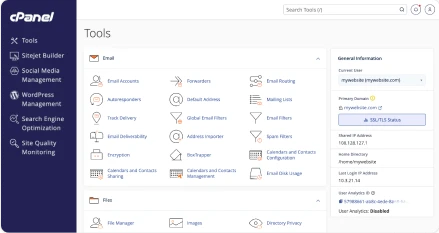
SSL management in cPanel is now more streamlined. Three separate SSL-related interfaces have been consolidated into a single unified SSL/TLS management page.
This reduces navigation friction, simplifies certificate workflows, and helps minimize configuration errors for end users. Update any internal processes or documentation that reference the previous SSL interface.
Improving Visibility and Control Across Server Environments
Several updates in v136 focus on making server management more consistent and easier to operate at scale.
Server-Wide PHP Error logging
Administrators can now configure PHP error logging across all accounts from a single WHM interface. This enables consistent logging configurations and supports faster troubleshooting across environments. Review and standardize your PHP logging settings at the server level.
Enhanced Log Retention Controls
New controls in WHM and cPanel provide greater visibility into web server log storage and lifecycle. This helps teams manage disk usage more effectively while aligning with logging and compliance requirements. Audit your current log retention settings and adjust them based on your storage and compliance needs.
Improved PHP Version Visibility
End-of-Life (EOL) and Hardened PHP versions are now clearly distinguished in the interface. This makes it easier to identify unsupported versions and prioritize upgrades based on risk. Review your servers for EOL PHP versions and plan upgrades where necessary.
MariaDB 11.8 support
MariaDB® 11.8 is now supported and available as an option in WHM’s Upgrade Database Version interface.
This gives teams more flexibility when managing database versions and planning upgrades across their environments. Review your current database versions and plan upgrades where appropriate.
Strengthening Session Security
Logging out via WebPros Account now fully terminates the global SSO session, rather than only ending the local cPanel or WHM session.
This aligns logout behavior with expected SSO standards and reduces the risk of lingering authenticated sessions.
Platform Updates: Final Support for Ubuntu 22.04 LTS
cPanel & WHM v136 is the last version to support Ubuntu 22.04 LTS. Customers currently running Ubuntu 22.04 should plan and initiate migration to Ubuntu 24.04 LTS using the ELevate upgrade path before upgrading beyond this release.
cPanel & WHM v136 supports:
- AlmaLinux 8, 9, and 10
- CloudLinux 8, 9, and 10
- Ubuntu 24.04 LTS
Built for More Consistent, Scalable Operations
cPanel & WHM v136 brings together improvements that make it easier to operate, secure, and scale hosting environments.
By integrating security updates, automating high-frequency tasks like SSL renewal, and centralizing configuration management, this release helps reduce manual work while improving consistency across systems.
Learn More
For full technical details, review the complete v136 release notes.